Ultimate DIY Guide to Replacing Brake Pads & Rotors 🛠️
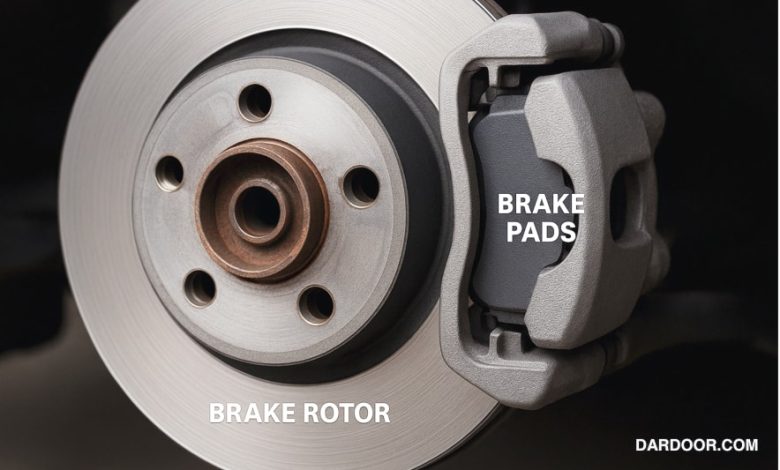
This comprehensive guide walks you through everything you need to know to safely and effectively replace your vehicle’s brake pads and rotors. We’ll cover symptoms of worn brakes, required tools, step‑by‑step instructions, torque specifications, troubleshooting, and preventive maintenance. OEM resources from Dardoor.com are referenced throughout to support accuracy and reliability.
1. Signs It’s Time to Replace Brake Pads & Rotors ⚠️
Brake components wear over time. Watch for these signs:
- Squealing or grinding noises: Indicates pad wear indicators or metal-to-metal contact with the rotor.
- Pulsation or vibration when braking: Usually caused by warped rotors.
- Longer stopping distances: A clear safety hazard signaling worn pads or glazed rotors.
- Uneven wear: One side of rotor or pad worn more than the other suggests caliper or slide pin issues.
- Visual inspection: Pads less than 3 mm thick or deep rotor grooves call for replacement.
Early detection prevents damage escalation and preserves caliper and sensor life.
2. Tools & Materials You’ll Need
Preparation is key. Here’s what you’ll need:
- Floor jack and jack stands (rated for your vehicle)
- Lug wrench or impact gun with correct socket size
- Ratchet and metric/SAE socket set (10–19 mm)
- C-clamp or brake piston compressor tool
- Caliper hanger or sturdy coat hanger wire
- Rubber hammer or mallet
- Brake cleaner and parts cleaner spray
- Torque wrench capable of 10–150 Nm (8–110 lb-ft)
- New brake pads and rotors (front and/or rear)
- Anti-seize lubricant and silicone-based brake grease
- Shop towels and wire brush
- Disposable gloves and eye protection
🔗 Find OEM-fit parts using the Brake Pad & Rotor Specifications catalog.
3. Safety Precautions 🛡️
Take these precautions before working:
- Park on a level surface and engage the emergency brake.
- Always use jack stands—never rely on a jack alone.
- Wear safety glasses and gloves. Brake dust may contain harmful particles.
- Loosen wheel lug nuts slightly before lifting the car.
- Handle brake fluid carefully—it’s corrosive.
- Ensure proper ventilation if working indoors; brake cleaner fumes are toxic.
4. Step-by-Step Replacement Procedure
4.1 Preparation
- Loosen lug nuts, raise the vehicle, and support it with jack stands.
- Remove wheels and inspect brake components for wear and damage.
- Clean hub surface to ensure rotor seating.
4.2 Caliper Removal
- Remove caliper guide-pin bolts (typically 13–17 mm).
- Hang caliper using a caliper hanger—avoid strain on brake hose.
- Slide pads out; note orientation of shims, clips, wear sensors.
4.3 Rotor Removal
- If the rotor is stuck, use penetrating lubricant and gently tap with a rubber mallet.
- Remove retaining screws if present, then slide off the old rotor.
4.4 Hydraulic Rewind
- Compress caliper piston using C-clamp/brake piston tool slowly.
- Open brake fluid reservoir cap and monitor fluid level to prevent overflow.
4.5 New Rotor Installation
- Clean new rotor with brake cleaner before installation.
- Mount rotor on hub, secure with screws if applicable.
- Apply a thin layer of anti-seize lubricant to rotor hat and hub interface.
4.6 Installing New Pads & Reassembling
- Grease pad contact points and retention clips with silicone brake grease.
- Install pads with correct orientation and reuse shims or sensors.
- Reinstall caliper, torque guide-pin bolts to manufacturer specs (typically 30–40 Nm).
- Ensure caliper moves smoothly and doesn’t bind.
4.7 Final Torque & Reassembly
- Hand-thread wheel lug nuts; lower vehicle to the ground.
- Tighten lug nuts in a star pattern to specified torque (check Dardoor’s OEM chart).
- Pump brake pedal to seat pads before driving.
5. Torque Specs & Fastener Details
| Component | Typical Torque Value |
|---|---|
| Caliper bracket bolts | 60–80 Nm (44–59 lb-ft) |
| Caliper guide-pin bolts | 30–40 Nm (22–30 lb-ft) |
| Wheel lug nuts | 100–140 Nm (75–105 lb-ft) |
| Rotor retaining screws | 8–12 Nm (6–9 lb-ft) |
Always cross-check your vehicle’s torque specs in the Brake System Diagram manual.
6. Common Issues & Troubleshooting
6.1 Brake Noise After Installation
If you experience squealing or chirping:
- Check anti-rattle clips and pad shims are installed correctly.
- Ensure rotors are clean—break-in glaze can cause noise.
- Perform a proper bedding-in procedure: multiple light to medium stops from 30–40 mph.
6.2 Vibration or Pulsation When Braking
Possible causes include:
- Rotor runout >0.05 mm—requires truing or replacement.
- Warped rotor—replace both for symmetry.
- Uneven brake pad transfer—fully bed-in pads and clean rotors.
6.3 Spongy Brake Pedal
- Air in the system—bleed brakes thoroughly.
- Brake fluid contamination—flush system per OEM interval.
- Master cylinder or caliper seal leaks—inspect and repair if needed.
6.4 Uneven Pad Wear
- Caliper slide pins corroded—clean and lubricate them.
- Sticking caliper piston—inspect and rebuild or replace caliper.
- Dragging caliper—verify pads retract freely when pedal is released.
7. Preventive Maintenance & Longevity Tips
- Check brake fluid annually and top-up with correct DOT-rated fluid.
- Inspect brake components every 10,000 miles or during tire rotations.
- Use OEM-fit parts from the Dardoor Brake Pad & Rotor Specifications catalog for best fit and performance.
- Clean caliper slides and pins during brake jobs to prevent sticking.
- Store your vehicle in dry conditions to minimize rust on rotors and hardware.
8. Frequently Asked Questions (FAQs)
Q: Can I replace only pads and not rotors?
Yes, but only if rotors are thicker than their minimum spec and free of grooves or warping. It’s often better to replace both to ensure optimal performance.
Q: How many miles do brake pads usually last?
Typical life expectancy ranges from 30,000–70,000 miles depending on driving habits, pad compound, and conditions.
Q: Is it necessary to bed in new brake pads?
Absolutely. Bedding-in transfers a thin layer of pad material to the rotor, ensuring consistent performance and noise reduction.
Q: Where can I find part numbers and specs?
Visit Dardoor’s Brake Pad & Rotor Specifications and Brake System Diagram for OEM diagrams, torque specs, and part numbers.
9. Conclusion & Further Reading
Tackling a brake job yourself not only saves money, but also gives you confidence in your vehicle’s safety and performance. This guide has equipped you with the tools, procedures, troubleshooting techniques, and maintenance strategies to do the job right.
Continue learning: Brake System Diagram, Brake Pad & Rotor Specifications, and other OEM repair guides are invaluable to support your DIY automotive journey.
Happy (and safe) wrenching! 🚗🧰